Providing Liquidity in Pools
Providing liquidity in pools is a great way to earn interest (yield) on your assets, and help Curve and DeFi at the same time.
Pools are groups of two or more assets. When you provide liquidity to a pool, you deposit your assets into that pool. This is called being an LP or Liquidity Provider. Traders can then trade between the assets within the pool. For example, if you are an LP in a crvUSD/USDC pool, the pool will have two assets: crvUSD and USDC. Traders can trade between crvUSD to USDC freely within the pool, and as an LP you earn fees from these swaps and other rewards.
If you're interested in all the different rewards you can earn as an LP, or what the numbers mean, see the page about understanding rewards: Understanding Rewards.
It's important to remember that providing liquidity to pools comes with risks. See the disclaimer here: Pool Risks
Below are links with guides on how to use the UI to deposit, withdraw, stake and claim your rewards.
Viewing Your Positions
Connect your wallet and open the Pools page on the network where you provided liquidity. Your Positions replaces the former user dashboard and lists your LP positions and claimable token rewards on that network.
The summary shows Total liquidity provided and Claimable rewards. Each pool row shows Net APR, Deposits in USD and LP tokens, and Claimables. Select View all pool positions to expand the list when more positions are available.
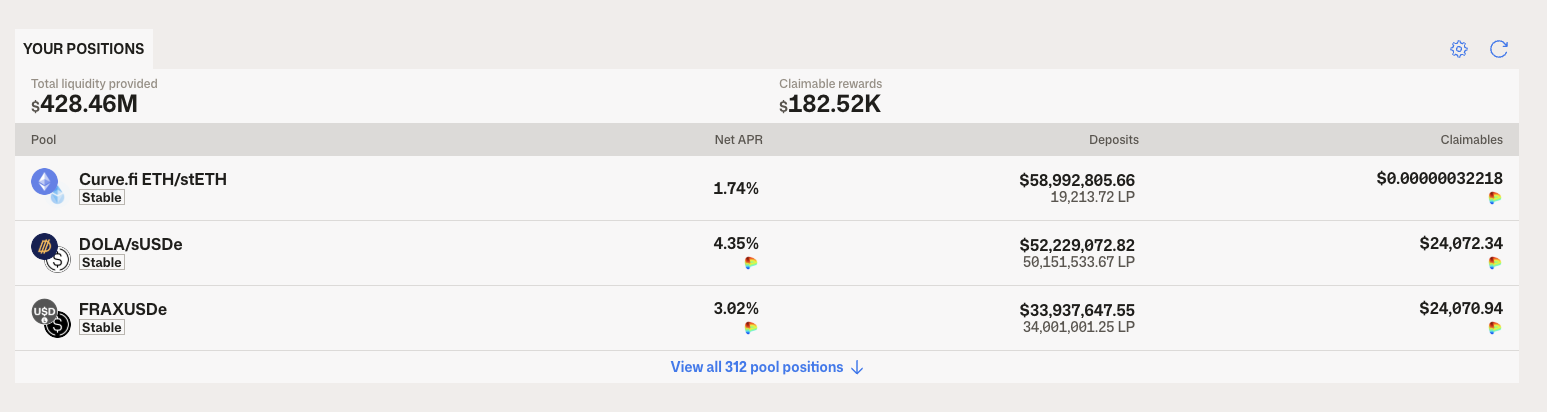
Open a pool to manage your liquidity or claim LP rewards. To claim veCRV protocol revenue, use Claim Fees on the DAO app's Lock CRV page; see Claiming veCRV Revenue Share.